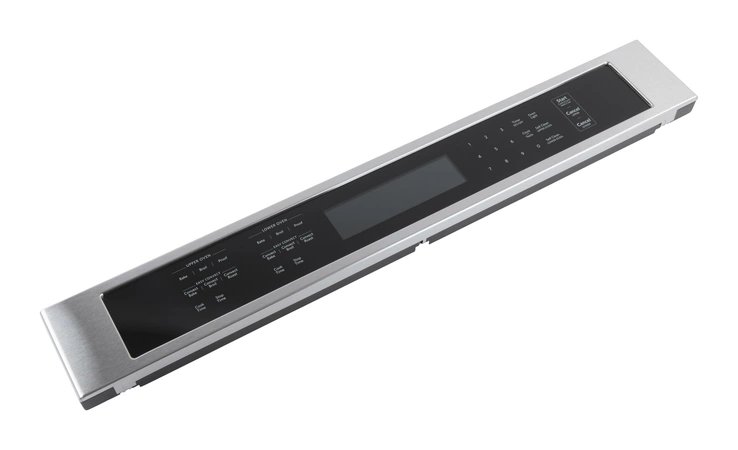

Whirlpool W11086141 Range Control Panel Assembly
Description
This Part Fits the Following Models
16 modelsWhirlpool Range W11086141 Console/Control Panel
It represents cutting-edge technology and ergonomic design, making cooking easier in your kitchen. These Whirlpool Range W11086141 Console/Control Panel serves as the command center for your Whirlpool range, providing a simple platform for precisely adjusting cooking settings. This console's straightforward controls allow you to easily adjust oven temperatures, cooking modes, and timer settings. The well-lit display and tactile controls make it simple to explore and adjust cooking settings, resulting in a smooth culinary experience. This stainless steel console provides a clean and modern look to your kitchen, matching the overall design of your appliance.
Key Features of the Whirlpool Range W11086141 Console/Control Panel
Selection buttons: different culinary functions such as baking, broiling, and roasting.
Temperature control :adjusting cooking temperatures with knobs or buttons.
Timer function: Set particular cooking times.
Display: Presents information such as the selected function, temperature, remaining time, and preheating progress.
Step1: Turn off Range power at the circuit breaker to prevent electrical shock.
Step2: Open the Range door and remove screws securing the control panel.
Step3: Gently pull the panel forward and disconnect wire harnesses.
Step4: Remove the old control panel assembly.
Step5: Connect harnesses to the new panel and position it in place.
Step6: Secure with screws and restore power to test operation.
-
What maintenance is required for the Whirlpool W11086141 Control Panel Assembly?
Keep the control panel clean by wiping with a soft, dry cloth to prevent moisture damage. Ensure buttons are free from grease buildup. Regularly inspect wiring connections to avoid loose contacts and ensure safe operation.
-
What are common issues with the Whirlpool W11086141 Control Panel Assembly?
- Unresponsive or sticky buttons.
- Display not lighting up or flickering.
- Erratic temperature or timer settings.
- Faulty connection to the range causing inconsistent performance.
Customer Reviews
No reviews yet. Be the first to write one!
Write a Review
We strive to provide our customers with a hassle-free and efficient shopping experience. Our shipping policy ensures the timely delivery of your orders and complete customer satisfaction. View More
We are committed to ensuring your complete satisfaction with every purchase. We understand that circumstances may arise where you must return a product or request a refund. If for any reason you are not satisfied, you may return the item(s) according to the terms outlined below. View More
This Payment Policy outlines the terms and conditions governing all payments made for products purchased through our website. By making a purchase, you agree to be bound by this Payment Policy. View More