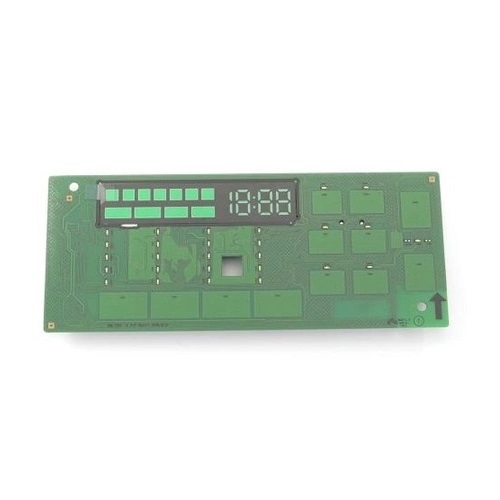

Samsung DC92-02390C Dryer User Interface
Description
The Samsung DC92-02390C Washer/Dryer Module-Fcd_Dry is an essential component that improves the performance of Samsung washer/dryer systems. This module is an important part of the drying process, ensuring that it runs smoothly and consistently. By managing numerous functions within the appliance, users may get comprehensive and effective drying outcomes on each cycle. The module improves the overall operation of the washer/dryer machine, providing exact control over drying temperatures and times. With its innovative technology and smooth integration with Samsung appliances, consumers may enjoy quicker drying times, lower energy use, and better clothing care. Whether handling ordinary laundry or sensitive materials, this module offers constant performance and outstanding drying outcomes, making it an essential component for Samsung washer/dryer users.
This Part Fits the Following Models
3 models| Manufacturer Name: Samsung Product Number: DC92-02390C OEM Part Number: DC92-02390C Product Description: Module-Fcd_Dry |
Choose the best Home Appliance parts and supplies from HnKParts!
Same Day Shipping
Best Quality And Best Price
Wide Range of Inventory
Best Customer Service
Have More Questions or Need Help to Place The Order?
Reach us at (866)723-0907 or [email protected]
Step1: Turn off power and unplug dryer for safety.
Step2: Remove top cover and control panel fascia carefully.
Step3: Disconnect existing user interface harness and note wiring positions.
Step4: Install new user interface board and reconnect all connectors firmly.
Step5: Reassemble panel and secure all screws.
Step6: Restore power and test all buttons and display operations.
-
What maintenance is required for the Samsung DC92-02390C User Interface?
Regularly wipe the dryer user interface with a soft, dry cloth to remove dust and residue. Avoid using chemicals or excessive moisture, which can damage the electronics. Ensure buttons are not pressed too forcefully to maintain responsiveness and prevent malfunctions.
-
What are common issues with the Samsung DC92-02390C User Interface?
- Unresponsive buttons or touch controls.
- Display screen flickering or not lighting up.
- Error codes appearing unexpectedly.
- Inconsistent or delayed command execution.
Customer Reviews
No reviews yet. Be the first to write one!
Write a Review
We strive to provide our customers with a hassle-free and efficient shopping experience. Our shipping policy ensures the timely delivery of your orders and complete customer satisfaction. View More
We are committed to ensuring your complete satisfaction with every purchase. We understand that circumstances may arise where you must return a product or request a refund. If for any reason you are not satisfied, you may return the item(s) according to the terms outlined below. View More
This Payment Policy outlines the terms and conditions governing all payments made for products purchased through our website. By making a purchase, you agree to be bound by this Payment Policy. View More